I recently published a mobile game that I developed in about 1-week. The whole plot was a rocket ship that is travelling and on the tap it flips the direction. My brother told me about this while we were playing Apex Legends and I created a Unity project before we went back to lobby and by the weekend, I had an early prototype ready for his review. The objective for me was to create a game that my daughter would love to play.
If you’re interested, check out Distant Ride Fail on the Play Store. I’ll appreciate that.
Distant Ride Fail
The whole plot of the game is a single-touch based mobile game. The whole objective of the game is to allow the user to use single-tap and help the ship cross the space. The space is infinite, and so the ship must traverse the area and avoid the incoming obstacles.
You can play the sessions unlimited numbers of time. You do have to restart the game session when you hit the obstacle.
Development
The game is created using Unity engine. The game is a simple loop of C# script that performs all the operations:
Generate the obstacles and set their translation and rotation.
Apply “wobble” movements to the rocket.
Track the movement and collision.
At the moment there are no trackers or analytics in the game.
The game code obviously has scripts that do “one task”, such as “wobble” and “obstacle detector” are all different script that use the main loop and update the state of the game. I tend to write the game logic with state so that the UI only renders the processed state and data on the screen, while the background processes can continue to run in the background.
Assets and UI
I used the Low Poly assets for the mobile-based interface. Also, the UI was created responsive. The UI stretches to accommodate the different screen factors and sizes.
Instead of Unity Input System, I used the Rewired package to handle the input as I intend to expand the actions and handlers to other input providers (mouse and keyboard, controllers, etc.). I will write more on that once I have published the game on Microsoft Store as well. For now, the only input being handled in the touch input.
Publishing Experience
I have only published the game to Android and Windows platforms. In my experience, Apple is always a tough platform to crack and getting your app (or game) published.
The game is currently live on Play Store, and undergoing a launch on the Microsoft Store as well.
The database for the twodos app was dropped because of a misconfigured environment variable, causing existing users to be logged out of accounts and unable to access their data for a while.
The problem has been resolved since and data has been restored. You can access the service here on twodos.app website or download the client apps.
Cause
The Docker image used for the deployment of backend API had an extra environment variable NODE_ENVIRONMENT added. The objective was to make the Docker image a development instance by default. On production, environment variables would be configured to override the development/staging values.
There was a data layer code that reads this variable on app start up and purges all the data from the database.
The sequelize database being force created when the Node environment is development.
This line was not gated properly and read a single variable to make such a big decision. The gate has been two-factored and an additional environment variable is now expected before the data can be purged making it difficult to enter this gate by mistake. Especially on production environments.
Impact
The misconfigured environment variable caused the database tables to be dropped with the data being truncated. This led all the existing users to lose the access to the application and the data that they had created.
This was detected first on staging environment and then was propagated to the production environment.
Resolution
The impact on existing users was minimal. The data is now recovered, and the application is performing normally.
To prevent this from happening again, the data layer environment gates have been two-factored to prevent single environments from purging the databases. Moving forward, to make such changes on a database, two variables need to be set that indicate the intention to remove or modify the data.
The data backup was used to rollback to an earlier version of the database.
Sincere apologies for the inconvenience caused.
The changes applied are part of a wider effort to make the application simpler, stable, and scalable on the UI-part. The changes in the API will make it possible to extend and improve:
Users and account management, to allow easier account creation, login, sharing, and access management for privacy reasons.
Lists and tasks management, to better expose the lists and tasks actions so that native platforms can compliment the data (add reminders, change the themes, etc.)
State management of the application to make the application faster.
Improved testing of the platform (API + app) to ensure the application performs and delivers what it aims to deliver.
We’ve received feedback from you all, especially around:
Emails and tokens not being delivered.
Application breaking (especially state management).
Lists and the tasks management UI being unclear.
We’re moving slowly toward releasing the application with all the improvements deployed a) first to our API and then b) a new version of the app on the client platforms.
From a developer’s perspective, it is no longer a hello-world testing world anymore. Todos are the new Hello World.
You’re doing groceries and you open the grocery list to find what items to buy and, boom, the list is no longer the last message in your WhatsApp chat thread anymore. Or, you have to scroll past a few messages to find the grocery list because you started another conversation.
Lastly, definitely it is possible to use Google Tasks or another application to create and share the lists, but as a developer you’d rather spend 10 days building something than 10 minutes using something that exists. I definitely chose the path to build something.
Developing the Backend
When I started working on the application’s API, I wanted to use TypeScript. I chose TypeScript for two reasons:
I wanted to learn TypeScript-based complete app development, testing, deployment, and patching.
I wanted to add a different tech stack to my belt–no, okay, I lied, I wanted to work with sequelize. It is one of my favorite ORMs (after Entity Framework Core, of course).
I developed the backend layer, which is barely an API that exposes certain actions that you can perform on the system. The API is exposed as a service, meaning, every interaction and action is done as a service; with your account + lists + tasks as the resources in the centre.
The application also has a static HTML page for the homepage. You can visit the website here: https://twodos.app.
The application is hosted on Microsoft Azure, and I am using Azure DevOps to manage the project and the entire software development lifecycle.
Using Flutter for UI development
Once I had the API ready, I tested it on Postman and via command-line based tests to perform user-journey actions. I knew it was time to do the UI. I wanted to give Flutter an opportunity to do the entire app development, cross-platform, and be able to patch and republish when possible and needed. The development went very smooth and I was able to target all major platforms. The objective I had was simple:
Make the application available on as many platforms as possible.
Keep the application simple.
The UI flows should correspond to the services and their features (the actions available).
For this reason, the Flutter was the perfect choice. Even though I have not been able to deploy a Linux version of the application, the other platforms work perfectly fine.
Oh, the iOS app was rejected by the App Store because it was too similar to other applications on the platform.
Flutter made it very simple to write the application as a UI layer for the backend services and communicate when an action was made. I used the following packages to speed up the development:
Retrofit: handling HTTP interactions with the server.
Provider: to handle state management.
I did not use Firebase because of a few reasons:
Firebase is not supported across all the Flutter platforms.
Analytics is useful, but, let’s be real. It is not supported for Windows, and that would mean either more work or less supported platforms.
I still need to work on the push notification support, but the goal with push notifications is not to handle background messages rather the updates to UI. Here is a quick use case:
You go to grocery shop and open the list for the grocery items.
Your partner (with whom the list is shared) updates the list of items in real time.
You receive the updated list in real-time without having to reload.
The items you pick up are communicated in real-time with your partner as you “tick” them.
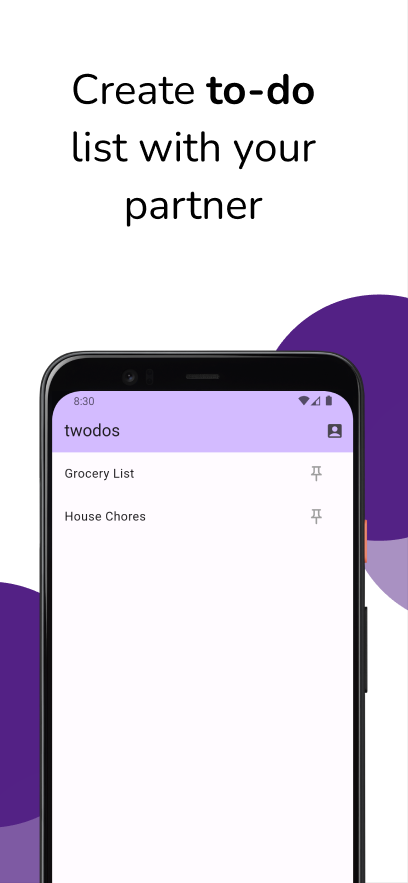
Figure 1: The goal of the application was always to make it easier to create lists and share the tasks and their current status with the partner.
The challenge with Flutter is that it is just a UI-development framework and a platform. It does not support anything complex, and once you start going down that rabbit hole you really see how Flutter lacks the performance–due to its declarative nature.
Roadmap
While the application is not a high priority for me, I definitely want to keep it active. For myself, at least. I would continue to add features and improve features or fix bugs to make the application stable. The goal is to:
Enable seamless accounts creation.
Enable push-notifications for in-app updates.
Allow blocking users or choose to keep your profile private.
Delete the lists and requests that do not receive interactions.
Make the app secure by running baseline privacy and vulnerability controls
Make the app building, testing, validation, screenshots, and deployment automatic via Fastlane.
Finally, not right away but another goal is to make the UI simpler so the interactions happen naturally and give a cross-platform twodos experience.
Download the application
Check out the application on the Play Store. The application is only available on Android for mobile devices, but is available on macOS or Windows platforms.
In the next blog, I will share the next updates as the application grows.